Epochron Multi-Stopwatch
August 11th, 2026
Most stopwatches assume one runner and one clock. Epochron is built for managing several running timers at once, organizing groups of stopwatches that hand a relay from one leg to the next and/or rank their members against each other, and predicting future splits/laps mid-race. It runs in a browser, works offline, and never asks for an account.
A recurring theme for personal projects is stuff that’s distance running / track & field projects due to my past as a runner. When combined with my preference for grassroots projects, I tend to try to find gaps in what can be done technically and what is already being done. In the distance running world, that gap seems to be wide, (for reasons I will leave to other posts).
This project was originally self-dogfooding. I went to a track meet to watch my old college team compete. I tried to track splits during races on my phone, but had trouble focusing on the race while also keeping splits, particularly when multiple competitors were involved. This seemed like a tractable problem, so I built a first version of a multi-stopwatch over the course of a couple weeks during the evening. It wasn’t perfect, but it made managing multiple stopwatches much easier than the other apps available at the time.
I kept idly coming up with feature my ideal stopwatch would have, but I realized I had made some fundamental mistakes in my haste to get a working version that would fundamentally prevent me from implementing them. I eventually decided to start over to build a better version to resolve those issues so I could add more meaningful features.
What Epochron Is🔗
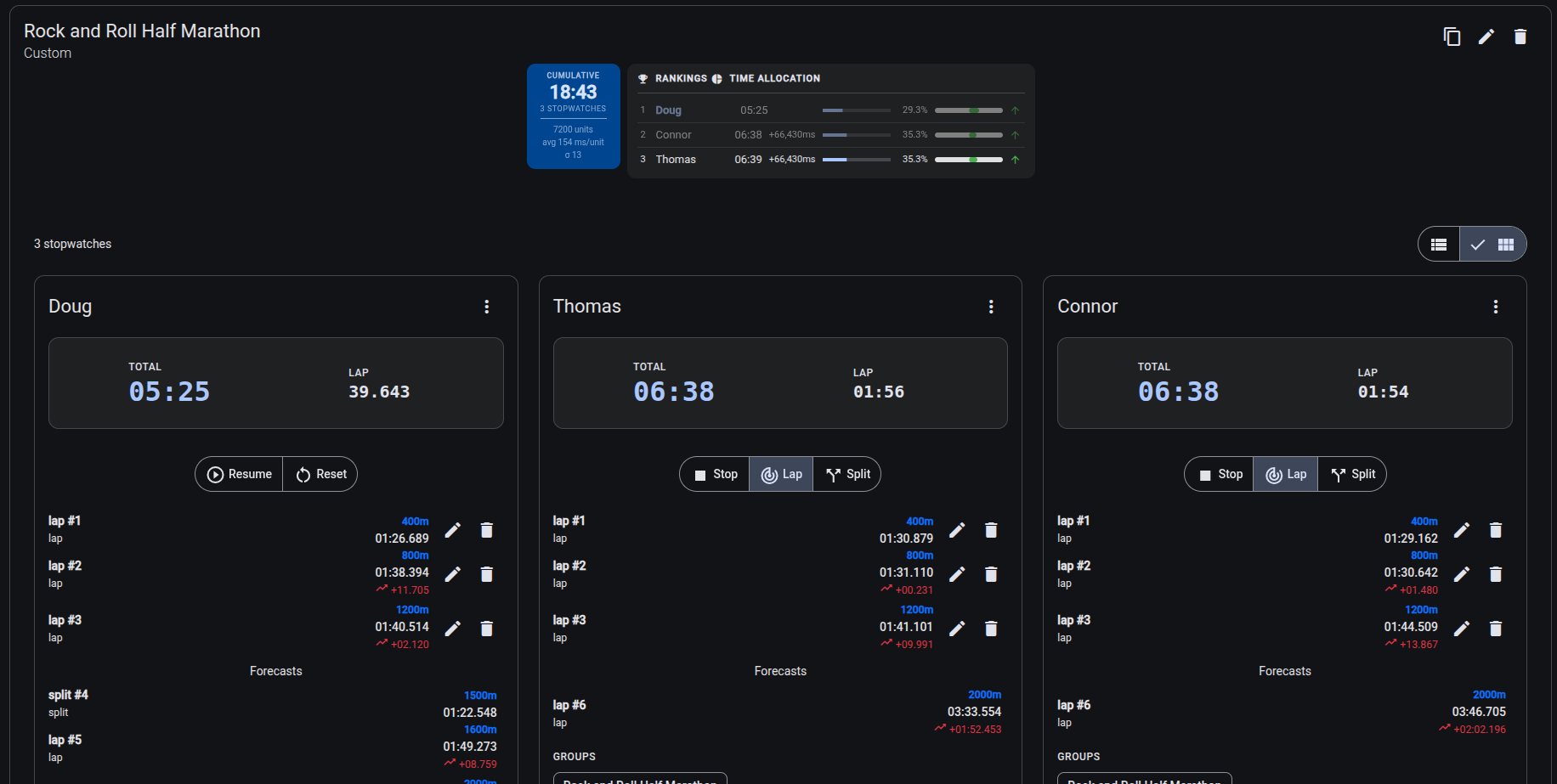
Epochron runs as many stopwatches as you need, at once, in a browser. Each one can be named, assigned to a group, and record splits and laps against distances. A running timer can be copied to start tracking someone else mid-race, which is the situation that started this whole thing. Sessions can be archived and searched later.
It installs as a PWA, so it can live on a phone’s home screen and keeps working without a signal, which matters because cell service at many cross country/track meets is reliably terrible. Everything stays on the device: so no data leaves the browser. That’s partly a privacy stance and partly a practical one, since a tool that needs a server is a tool that fails in the field.
It’s built in Angular v22 and TypeScript, free, and the source is on GitHub. It can be used without sign-ups or downloads.
Stopwatch Structure🔗
A stopwatch is fundamentally just a set of labelled timestamps, starting with a start timestamp, and ending with a stop timestamp, with split and lap timestamps in between. This is fundamentally how this stopwatch is structured: as a
export interface UnitValue {
    value: number;
    unit?: string;
}

type OperationalStopWatchEventType = 'start' | 'stop' | 'resume';
type UserOperationalStopwatchEventType = 'user_start' | 'user_stop' | 'user_resume';
export type PerformanceMonitoringStopWatchEventType = 'split' | 'lap' | 'interval';
export type StopWatchEventType = OperationalStopWatchEventType | UserOperationalStopwatchEventType | PerformanceMonitoringStopWatchEventType;

export interface BaseStopwatchEvent<T extends StopWatchEventType> {
    metadata: CreationModificationDates;
    type: T;
    timestamp: Date;
    unit?: UnitValue;
}

type StartEvent = BaseStopwatchEvent<'start'>;
type StopEvent = BaseStopwatchEvent<'stop'>;
type SplitEvent = BaseStopwatchEvent<'split'>;
type LapEvent = BaseStopwatchEvent<'lap'>;

export interface StopwatchState {
    sequence: BaseStopwatchEvent[];
    lap: UnitValue | null;
}
By only storing timestamps, we can
- Dynamically derive our stopwatch view at runtime
- Simplify adding/removing splits and modifying splits/laps (if necessary), as the corresponding changes to the stopwatch are automatically derived.
- Add more stopwatch event types as needed, which is a core aspect of adding more features
Groups🔗
In the original version of the stopwatch web app, users could only select multiple stopwatches temporarily to either start/stop them all at once or to add a split/lap. That functionality is preserved but also extends it to allow users to assign stopwatches to persisting groups. This lets users only view/use specific stopwatches at a given time. More importantly, it allows users to designate the relationship between specific stopwatches, which I break into GroupTimingBehavior and GroupEvaluationBehavior:
export type GroupTimingBehavior =
    | 'parallel'        // Stopwatches run simultaneously (e.g., team members working on the same task)
    | 'sequential'      // Stopwatches run in a defined order (e.g., relay race or assembly line)
    | 'independent'     // No timing constraints
    | 'synchronized'    // Start/stop together
    | 'overlapping';    // Partial temporal overlap (e.g., shift handoffs)

export type GroupEvaluationBehavior =
    | 'independent'     // No relation of evaluation
    | 'comparative'     // Ranked/compared against each other
    | 'cumulative'      // Summed for totals
    | 'threshold'       // Measured against targets/SLAs
    | 'proportional'    // Analyzed as percentages of whole
    | 'trending';       // Tracked for patterns over time

export interface GroupTraits {
    timing: GroupTimingBehavior;
    evaluation: GroupEvaluationBehavior[];
}
By default, a group is assigned independent timing behavior, and independent evaluation, meaning they are only in the group for convenience and will not be evaluated against each other. Users can assign a different timing behavior, and assign one-or-more evaluation behaviors.
Timing Behavior🔗
These represent how the user intends on using the stopwatches in a group. For example, if they are tracking concurrent race between individuals (individual or parallel), or are they tracking the members of a relay (sequential).
- Sequential: Useful for when stopwatch need to run in a defined order, like in a relay race or in an assembly line. This add a single start/stop button to the group, where when the start button initially starts the first stopwatch, and when the stop button is clicked, the next stopwatch is automatically started, ensuring no time is lost.
- Parallel: Useful for when the stopwatch are for the same concurrent task.
- Synchronized: Useful for when stopwatches must start and/or stop together. This adds a button to the UI to allow easy start/stop of all stopwatches in the group.
It is worth noting that timing behavior can be changed at any point, so a user can change them based on their given momentary task.
Evaluation Behavior🔗
These represent how the user intends on evaluating the stopwatches in a given group. Stopwatches can be evaluated based on multiple behaviors concurrently, so a group of stopwatch can have multiple evaluation behaviors at the same time. For these evaluation behaviors to be useful, the user must be setting laps, and/or adding distances to the splits they record.
- Comparative: Stopwatches in the group are to be compared against one another. This results in rankings being shown at the group-level, with relative times between them
- Cumululative: The aggregated elapsed stopwatch time of all the stopwatches is meaningful. The group view will show the aggregated stopwatch time.
- Proportional: Shows stopwatch times at the group-level as percentages of the aggregate elapsed times.
- Trending: The viewer will be evaluating the stopwatches based on their trends while running. This will result in the group view identifying and displaying trends identified per-stopwatch while they are running.
As with timing behaviors, evaluation behaviors can be changed at any point, so a user can change them based on their given momentary task.
Time / Split Prediction🔗
During a race, coaches and enthusiasts are often projecting in their minds whether someone is on-pace or off-pace, or their projected time at given distances. I updated the multi-stopwatch to do split prediction based on previous lap and splits. It takes a rigorous approach. There were two pieces necessary to provide this functionality automatically:
- Time prediction: Can we make confident predictions?
- Split prediction: If we can make confident prediction predictions, which distances/splits should we predict?
Rather than coming up with a unified formula for predicting each, I implemented a variety of approaches for each problem.
Time prediction🔗
All five approaches share the same shape. They work on segments rather than cumulative splits, since the fifth 400m tells you more about the sixth 400m than the total time through 2000m does. Each approach fits some model of pace to those segments, projects it forward a segment at a time until it reaches the target distance, and accumulates the variance of each projected segment as it goes. The output is never a bare number: it’s a point estimate paired with a confidence interval, which is what makes the first question answerable at all. The same machinery runs in reverse, so each can also answer where a runner will be at a given time rather than when they’ll reach a given distance.
What separates them is the assumption each makes about how pace changes over a race, and how much data that assumption costs.
- The Kalman filter assumes a true pace exists underneath the hand-timing noise, and also needs 2 splits.
- The regressions assume a linear trend and want 3.
- Generalized progression needs 4 splits before it will try to distinguish one pattern from another.
Those minimums are the practical answer to whether we can predict confidently: rather than one global threshold, each approach stays quiet until it has enough to work with, and falls back to something simpler when its own assumptions break down mid-race.
- Exponentially Weighted Moving Average (EWMA)
- Assumption: assumes nothing beyond “recent is more relevant”
- Minimum splits: 2
- Simple exponential smoothing is applied to pace, which is a weighted average of segment paces with no trend term at all, where every prior split still counts but geometrically less. It makes the fewest assumptions of the currrent approaches and will lag a runner who is steadily changing pace, which is exactly the trade for being the one approach that works on almost no data.
- Kalman Filter
- Assumption: assumes a true pace exists underneath the hand-timing noise
- Minimum splits: 2
- Models a latent “true pace” that evolves with process noise, observed with measurement noise. Hand timing is noisy in a way the other approaches treat as signal, and separating the two is the whole point. It can optionally carry a drift term to model systematic pace change. Process and measurement noise are estimated from the splits themselves rather than known ahead of time, so the estimates are principled but not optimal in the strict sense.
- Regressions:
Assume a linear trend.
Minimum splits: 3
- Ordinary Least Squares (OLS) Linear Regression: Fits pace as
ax + b, choosing the coefficients that minimize squared error across the observed segments, then integrates the fitted pace forward.xis the segment number by default, but can instead be cumulative distance or cumulative time, which separates distance-related fatigue from time-related fatigue. When no trend exists the slope goes to zero and the prediction collapses to the mean pace. - Weighted Least Squares (WLS) with Recency Decay: Similar to linear regression, but weighs the error of more recent splits higher. Weights decay exponentially with age down to a floor, so early splits lose influence without ever dropping out entirely.
- Ordinary Least Squares (OLS) Linear Regression: Fits pace as
- Generalized Progression: Changes in pace often follow a regular shape, so this fits several candidate shapes and keeps whichever explains the splits best. The three below are the same linear fit under a Box-Cox transform (λ = 1, 0, and -1 respectively), which means additional shapes cost nothing but a new λ. Candidates are scored by AICc, the small-sample correction to Akaike’s Information Criterion, so one always wins; the criterion ranks the shapes against each other rather than testing whether any progression exists at all.
- Minimum splits: 4
- Arithmetic: Splits are increasing/decreasing by a precise number (ex. Doug’s 400m splits are dropping 5 seconds each)
- Geometric: Splits are increasing/decreasing by a percentage (ex. Doug is slowing down by 5% every 400m)
- Harmonic: Speed is increasing/decreasing by a specific rate (ex. Doug’s speed is dropping by exactly 0.5 meters per second every 400m). The name is exact rather than loose: a harmonic progression is one whose reciprocals form an arithmetic progression, and speed is the reciprocal of pace.
Since no single approach is right for every race, the predictions can also be combined. An ensemble runs all of them and blends the results, weighting each by the tightness of its confidence interval, by its recent accuracy, or equally. An adaptive selector instead scores the candidates against the last few segments and hands the race to whichever is currently performing best.
Lastly, you may notice that many of these approaches are domain-agnotic mathematical approaches rather than running-specific. I chose that approach because
- The first version had users who were tracking things outside of running, so I want it to be able to offer timing predictions for anyone timing anything
- The mathematical approach seemed to be more robust since I can quantify error/assumptions more reliably.
Split prediction🔗
For split prediction, we account for the split distances that have already been recorded, since the application does not currently know what the target distance (if any) of the stopwatch is.
The approaches fall into two families: continuing the rhythm the user has already been recording, or working out which distances are meaningful for their sport.
Pattern continuation🔗
These only look at the recorded splits and the lap, and make no assumptions about the sport. Splits taken by hand are never exact, so each matches within a tolerance rather than on equality.
- Fixed Interval: Splits are being taken at a consistent distance (ex. 400/800/1200 predicts 1600). Deltas are clustered rather than compared directly, and a majority of them have to fall in the same cluster before an interval is claimed.
- Delta Sequence: Splits repeat on a cycle rather than a single interval (ex. 0/100/400/500/800 predicts 900, not 1200). A cycle is accepted while most of its positions still match, so one missed or late split doesn’t invalidate it.
- GCD Grid: Splits sit on a grid coarser than their pattern of use, which distinguishes every other grid position from every one (ex. 200/600/1000 predicts 1400, not 1200). Distances are rounded before the divisor is taken, since a single stray meter would otherwise collapse the grid.
- Lap Relative: Splits recur at the same position within a lap regardless of absolute distance (ex. always at the 200m mark of a 400m lap). Positions are grouped circularly, so a split taken just before the line stays with the ones taken just after it.
- Ratio / Fractional: Same as lap-relative, but in fractions of a lap, which matters when the lap doesn’t divide cleanly (ex. three-quarters of a 333.33m lap). Each position snaps to the nearest fraction people actually use, and anything that lands near none of them is ignored.
Milestone inference🔗
These assume people stop the watch at round numbers, so the question becomes which set of round numbers applies. Each sport gets a definition covering its base unit, conventional milestones, applicable distance range, expected pace range, and the lap distances that imply it. Every match is scored rather than accepted or rejected, so a near miss lowers confidence instead of eliminating a system.
- Lap-Based: Lap distance implies the sport (ex. 25m is swimming, 200m/400m is indoor/outdoor track, 1000m is road racing, 2000m is rowing).
- Round Number Affinity: Splits are scored against each system’s milestones, base unit, and distance range (ex. 1000/2000/3000 scores nearly perfectly for metric kilometers).
- Pace-Based: Median pace narrows the field on its own (ex. 0.9 sec/m is swimming and cannot be cycling), and the median is used specifically so a single bad split doesn’t move it.
- Composite: Weights the three inferences above, with lap highest and round number affinity lowest, and rewards agreement between them.
- Target Distance: Generates milestones up to a known or inferred finish, and appends the finish itself as the final split.
As with timing predictions, these implementations are domain-agnostic and are aimed at finding good prediction milestones regardless of the domain.
Try It🔗
Epochron is live at stopwatch.dougfenstermacher.com and the source is at github.com/dpfens/stopwatch, under the Unlicense. It’s at v0.2.0 and still moving; if you time things for a living or a hobby and something here does not fit how you actually work, I want to hear about it.